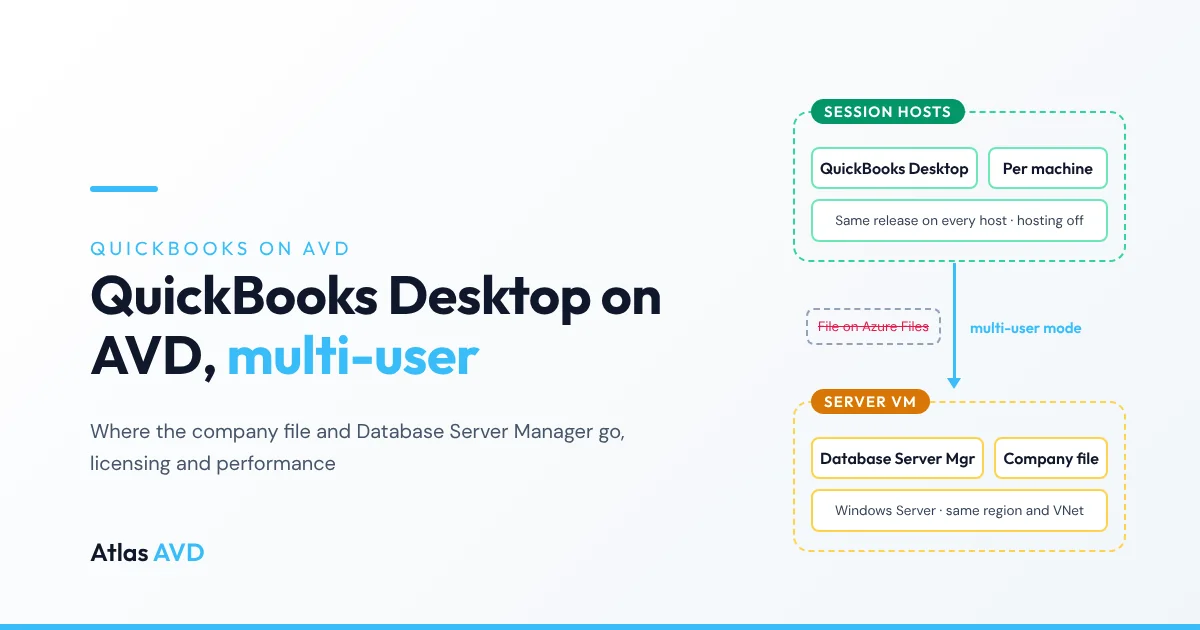
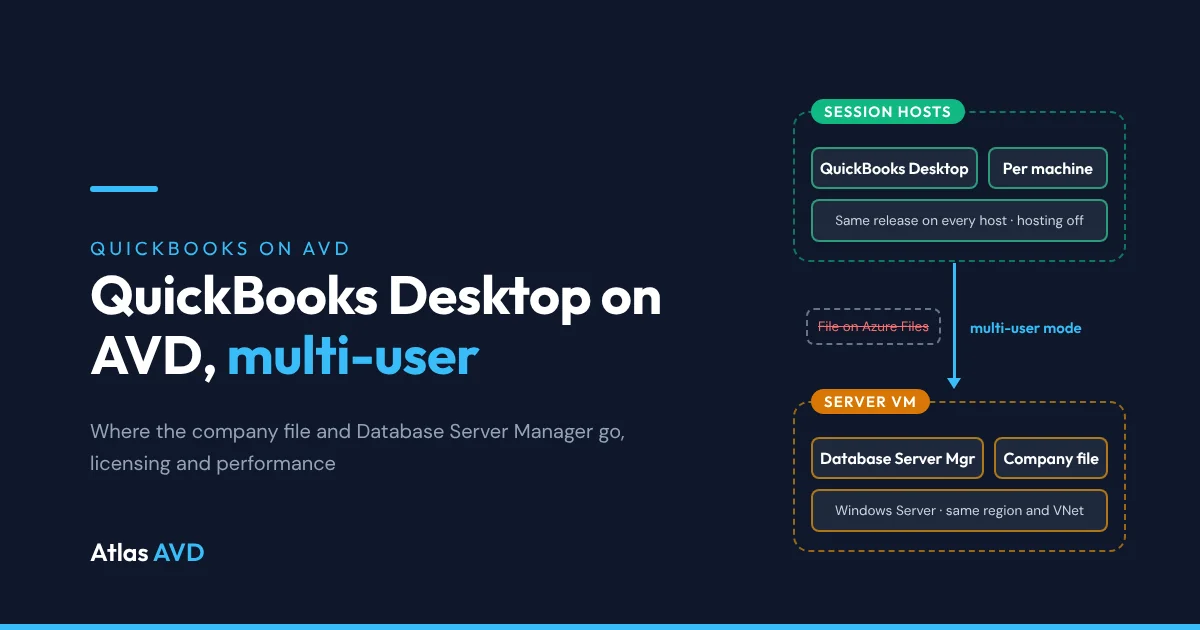
QuickBooks Desktop runs on Azure Virtual Desktop (AVD) the way it runs on a Remote Desktop Services server: install QuickBooks per machine on the session hosts, and keep the company file on a separate Windows Server VM in the same Azure region, running QuickBooks Database Server Manager. Users then open the file in multi-user mode over the network, so every host works on one copy of the books and no session host ever holds the data.
The short version: put the company file on a small Windows Server 2022 VM in the same region and virtual network as your host pool, install only Database Server Manager on it, and turn hosting on there and nowhere else. Install the same QuickBooks release on your golden image, open the file by its network path, and never keep it on Azure Files, in an FSLogix profile or on a session host. You need a QuickBooks user license for each simultaneous user, plus the Microsoft license your host OS needs.
How QuickBooks multi-user mode works on AVD
QuickBooks Desktop has two parts, and on AVD they live on different machines:
- QuickBooks Desktop, the app people use, runs on the session hosts. With several people on a multi-session host, each runs their own copy of QuickBooks inside their own session.
- QuickBooks Database Server Manager shares the company file with those copies. Intuit says to "install the tool on the server computer that hosts your company files". It runs as a Windows service, so it keeps serving the file when nobody is signed in to the server.
When QuickBooks on a session host opens the company file in multi-user mode, it talks to Database Server Manager on the server instead of opening the file directly. That's what lets several people enter transactions in the same file at once.
| Component | Where it goes on AVD | Why |
|---|---|---|
| QuickBooks Desktop | Every session host, installed per machine on the image | Each user's QuickBooks runs in their own session |
| Company file (.QBW) | A Windows Server VM in the same region and virtual network as the hosts | One copy of the books that outlives any host |
| Database Server Manager | The same Windows Server VM | It must run on the computer that holds the file |
| Hosting multi-user access | On for the server only | Intuit says the server "should be the only computer with this feature on" |
| Backups | The server VM and QuickBooks' own backups | Session hosts hold nothing worth restoring |
Where to put the company file
The company file is the decision that makes or breaks QuickBooks on AVD. Because Database Server Manager has to run on the machine that holds the file, the file needs a Windows machine that stays put.
| Location | Multi-user mode | Our verdict |
|---|---|---|
| Windows Server VM in the same region and virtual network, running Database Server Manager | Yes | Use this. It's Intuit's client-server layout, moved into Azure next to the hosts |
| A session host in the pool, hosting the file itself | Works until the host changes | Avoid. Pooled hosts are drained, reimaged, replaced and powered off by scaling, and the books go with them |
| Azure Files, or any NAS | Database Server Manager can't run there | Avoid. Intuit community staff describe storing the file on a NAS as "not supported/recommended" |
| An FSLogix profile, OneDrive or a user's Documents folder | No | Never. The file belongs to one user's profile and sync tools aren't built for a live database file |
| An office server on-premises, over VPN | Yes, slowly | Avoid. Multi-user traffic is chatty, and every round trip crosses the VPN |
Keep the server in the same Azure region and virtual network as the session hosts. QuickBooks multi-user mode sends many small requests between QuickBooks and the server, so the distance between them matters far more than the distance between the user and AVD. That's also why the remote option works at all: the user's connection only carries the screen, while the busy traffic stays inside one Azure region.
Which operating system for the session hosts?
Intuit's technical specs for QuickBooks Desktop Enterprise list Windows 10 and Windows 11 (64-bit) as client operating systems, and Windows Server 2016, 2019 and 2022 for the server. The same page says QuickBooks Desktop Enterprise "is Remote Desktop Services compliant". It doesn't mention Windows 11 Enterprise multi-session, the AVD-only edition most host pools run.
| Host OS | What Intuit lists | Microsoft license for AVD users |
|---|---|---|
| Windows Server 2022 | Listed as a server OS. RDS is the setup Intuit describes for hosted QuickBooks | RDS CAL with Software Assurance, or an RDS User Subscription License |
| Windows 11 Enterprise multi-session | Windows 11 is listed; the multi-session edition isn't named | Microsoft 365 E3, E5, F3 or Business Premium, Windows Enterprise E3 or E5, among others |
| Windows Server 2025 | Not listed. Intuit community staff said QuickBooks Desktop Enterprise 2024 doesn't support it | RDS CAL with Software Assurance, or an RDS User Subscription License |
Our advice: if QuickBooks is the reason the host pool exists and you want to stay inside what Intuit lists, use Windows Server 2022 session hosts, often publishing QuickBooks as a RemoteApp. If QuickBooks is one app on a general desktop, Windows 11 Enterprise multi-session is the usual choice: test your exact QuickBooks version on it before you move the firm. Use Windows Server 2022 for the server VM that holds the company file either way. Windows 11 multi-session vs Windows Server covers the wider trade-off, and RemoteApp vs full desktop covers publishing one app.
Licensing: QuickBooks and Microsoft
You license QuickBooks and AVD separately, and both count users.
| Edition | Simultaneous users | Sold to new US customers? |
|---|---|---|
| QuickBooks Desktop Pro Plus | Up to 3 | No, not since September 30, 2024. Existing subscribers can renew |
| QuickBooks Desktop Premier Plus | Up to 5 | No, not since September 30, 2024. Existing subscribers can renew |
| QuickBooks Desktop Enterprise | 1 to 10, or up to 40 | Yes |
- QuickBooks user licenses. Each person working in the file at the same time needs a QuickBooks user license, and multi-user mode needs at least two. A license for two users isn't the same as two single-user licenses, so check what you bought before you plan the pool.
- Microsoft licenses. Windows 11 Enterprise multi-session hosts are covered by the per-user Microsoft 365 or Windows Enterprise licenses AVD already needs. Windows Server hosts need an RDS CAL with Software Assurance, or an RDS User Subscription License, per user or device. Intuit's Enterprise specs say the same from its side: "a Remote Desktop Services Client Access License is required for each user".
- Supported versions. Intuit retires each QuickBooks Desktop year on a schedule: QuickBooks Desktop 2023 was discontinued after May 31, 2026, when its security updates, live support and services such as Payroll and online banking stopped. Plan an image update for each new year rather than running an old one until it stops.
- Hosting for others. If you're an MSP running QuickBooks for several clients on infrastructure you own, rather than in each client's own Azure tenant, read Intuit's license agreement on hosting before you build it.
Setup checklist
The QuickBooks server VM
- Build a Windows Server 2022 VM in the host pool's region and virtual network, on Premium SSD. Intuit's Enterprise specs size server RAM by users: 8 GB for 5 users, 12 GB for 10, 16 GB for 15 and 20 GB for 20 or more.
- Install only Database Server Manager on it. Intuit's installer has this option for a server that only hosts files. QuickBooks creates a Windows user for each version (
QBDataServiceUserfollowed by the version number), and that user needs permission on the folder holding the company files. - If you host more than one QuickBooks year, install the oldest Database Server Manager first and the newest last, as Intuit says.
- Scan the company file folder in Database Server Manager, so it can host the files there.
- Allow QuickBooks through Windows Firewall on the server. The ports depend on the QuickBooks version, so read them from Database Server Manager's Port Monitor tab instead of copying a list from the web, and limit the rule to the session hosts' subnet.
- Back it up. Protect the VM with Azure Backup and keep QuickBooks' own backups as well, so you can restore one company file without restoring the whole server.
The golden image and session hosts
- Install QuickBooks Desktop per machine on the image, at the same version and release as the server. Update the image and the server together.
- Turn hosting off on the session hosts. Only the server hosts multi-user access.
- Open the file by its network path, for example
\\qb-server\QuickBooks\Company.qbw, or through a mapped drive that's the same on every host. A path that differs between hosts confuses users and QuickBooks alike. - Plan printing. Cheque and form printers usually follow the finance team, not the host. Printing without a print server covers the options.
Day to day
- Set a disconnect limit. A user who closes the window without logging off can keep the company file open. Several admin jobs, such as condensing data, need everyone out of the file, so log off disconnected sessions after a sensible limit.
- Start the server first, stop it last. If the host pool runs on a schedule, the QuickBooks server needs to be up before the first user signs in and stay up until the last one leaves.
Performance and troubleshooting
| Symptom | Likely cause | Fix |
|---|---|---|
| Slow to open the file or switch screens | The company file is on Azure Files, a NAS, on-premises or in another region | Move it to a Windows Server VM in the same region and virtual network, running Database Server Manager |
| H202 or H505 when opening in multi-user mode | QuickBooks can't reach Database Server Manager: the service is stopped, the firewall is blocking it, or hosting is on somewhere else | Check the service and Port Monitor on the server, and turn hosting off on every session host |
| Can't switch to single-user mode | A disconnected session still has the file open | Log that session off, then set a disconnect limit |
| QuickBooks offers to update the company file | A session host runs a newer QuickBooks year than the server | Keep the image and Database Server Manager on the same version, and update them together |
| Everyone on a host is slow during month-end | The host is short of CPU or memory | Intuit asks for 8 GB of RAM on a QuickBooks computer and recommends 16 GB, and a multi-session host shares its memory between users: size it with the AVD sizing guide |
| Slow sign-in before QuickBooks even opens | Profile or logon problems, not QuickBooks | Work through why AVD logons are slow |
Keep calls out of the way of the books, too. If the same users are on Teams all day, check it's optimized so call media doesn't compete with QuickBooks for host CPU: see Teams on AVD.
Running Sage alongside QuickBooks, or instead of it? The same layout of program on the hosts and data on a server VM applies: see Sage on AVD for Sage 50, Sage 100 and Sage 300.
Where Atlas AVD helps
Atlas AVD doesn't install, license or configure QuickBooks, and it doesn't manage Database Server Manager. It keeps the hosts QuickBooks runs on consistent, and helps the server and the hosts keep the same hours.
- One image, every host. Install QuickBooks on your golden image, capture it in Imaging, and Atlas builds every host in the pool from that version. Rolling Replace moves the pool onto a new image in batches when you move to a new QuickBooks release.
- The server on the same schedule. Auto On/Off Scheduling works on any Azure VM in the subscriptions Atlas manages, not only session hosts, so the QuickBooks server can start before the hosts and stop after them.
- No one cut off mid-entry. DrainGuard stops new connections to an idle host while letting the sessions on it finish, so scaling in doesn't end someone's work in the company file.
- Stuck sessions without a ticket. With Smart Recovery, a user whose session has frozen resets it themselves from the portal.
- Busy season. The autoscale engine adds capacity for the filing deadline and removes it afterwards. See Atlas AVD for accounting.
FAQ
Can QuickBooks Desktop run on Azure Virtual Desktop?
Yes. Install QuickBooks Desktop on the session hosts and keep the company file on a Windows Server VM in the same Azure region, running QuickBooks Database Server Manager. Users then open the file in multi-user mode. Intuit lists QuickBooks Desktop Enterprise as Remote Desktop Services compliant.
Where should the QuickBooks company file live on AVD?
On a Windows Server VM in the same region and virtual network as the host pool, with Database Server Manager installed and hosting turned on there only. Don't keep it on a session host, in an FSLogix profile or in OneDrive.
Can I put the QuickBooks company file on Azure Files?
Not for multi-user mode. Database Server Manager has to run on the Windows computer that holds the file, and it can't run on Azure Files or a NAS. Intuit community staff describe storing the file on a NAS as not supported or recommended.
Does QuickBooks Desktop support Windows 11 Enterprise multi-session?
Intuit lists Windows 10 and 11 (64-bit) as client operating systems and Windows Server 2016, 2019 and 2022 as server operating systems, but doesn't name Windows 11 Enterprise multi-session. Many firms run it there; if you want to stay within Intuit's list, use Windows Server 2022 session hosts.
How many users can use QuickBooks Desktop at once on AVD?
As many as your QuickBooks license covers: up to 3 for Pro Plus, up to 5 for Premier Plus, and up to 40 for Enterprise. AVD doesn't change those limits.
Do I need RDS CALs to run QuickBooks on AVD?
Only on Windows Server session hosts, where each user or device needs an RDS CAL with Software Assurance or an RDS User Subscription License. Windows 11 Enterprise multi-session hosts use the Microsoft 365 or Windows Enterprise licenses AVD already requires.
Last updated 17 November 2026. QuickBooks details are taken from Intuit as of November 2026: QuickBooks Desktop Enterprise technical specs, Using the QuickBooks Database Server Manager, Install QuickBooks Desktop, QuickBooks Desktop stop-sell and the QuickBooks Desktop service discontinuation policy. Microsoft licensing is from Licensing Azure Virtual Desktop on Microsoft Learn. Intuit updates its requirements with each QuickBooks year, so check them before you upgrade.