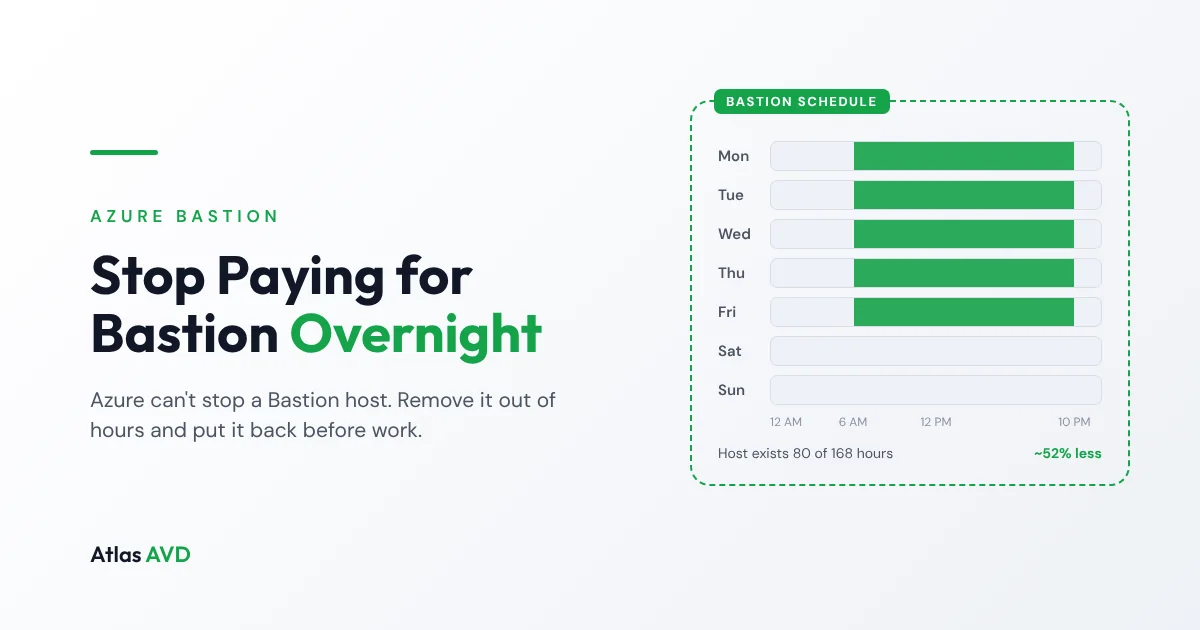
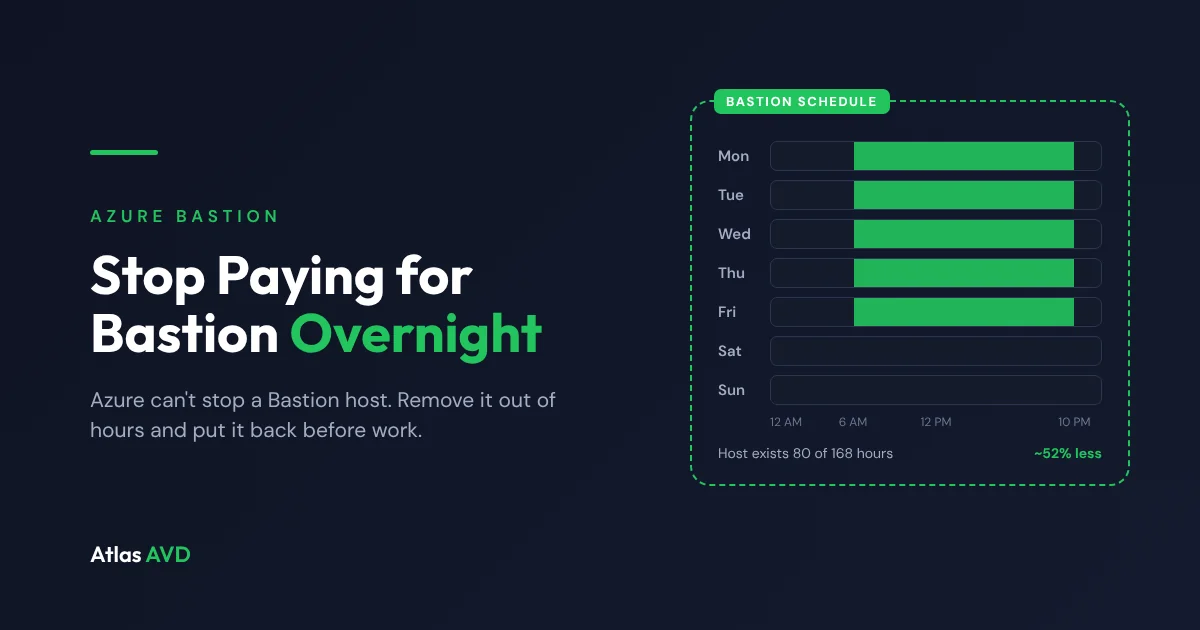
Azure bills an Azure Bastion host for every hour it exists, whether anyone connects through it or not, and unlike a VM it has no stop or deallocate. The only way to stop paying for a Bastion host overnight is to delete it and recreate it before people need it again. Done on a schedule, with the subnet and public IP left in place, that cuts the host charge by roughly half for a team that works weekdays.
The short version: a Bastion host on a 6 AM to 10 PM, Monday to Friday schedule exists for 80 of the week's 168 hours, so you pay for 48% of the hours you pay for today. The catch is that Azure keeps none of the host's settings when you delete it, so whatever removes it also has to remember how to rebuild it.
Why a Bastion host costs money while nobody is using it
Bastion is billed per hour of deployment, not per session. A Basic or Standard host costs the same at 3 AM on a Sunday as at 10 AM on a Tuesday, and extra scale units on Standard and Premium are billed by the hour on top. Data leaving the host is charged separately, but for most teams that's small next to the hourly charge.
Azure has no way to pause that charge. There is no stop, no deallocate and no auto-shutdown setting for Bastion, and scaling a Standard host down to two instances still leaves the base charge running. The Developer SKU is free, but it only serves one connection at a time and lacks the features most teams moved to Standard for, so it isn't a substitute for a shared host.
What removing it out of hours saves
The saving is simply the share of the week the host no longer exists:
| Schedule | Hours the host exists each week | Share of today's host charge |
|---|---|---|
| Always on | 168 | 100% |
| 6 AM to 10 PM, every day | 112 | 67% |
| 6 AM to 10 PM, Monday to Friday | 80 | 48% |
| 7 AM to 7 PM, Monday to Friday | 60 | 36% |
At US list prices at the time of writing (around $0.19 an hour for Basic and $0.29 an hour for Standard), the weekday schedule saves roughly $870 a year on a Basic host and $1,330 a year on a Standard host, before any extra scale units. Multiply that by every hub or spoke network that has its own Bastion, and by every customer if you're an MSP, and it adds up quickly. Check the Azure Bastion pricing page for your region and SKU.
The public IP address keeps billing while the host is gone, because you keep it so the address doesn't change. A Standard public IP is a few dollars a month, a small fraction of the host.
What goes wrong when you script it yourself
The usual do-it-yourself version is an Azure Automation runbook that deletes the host at night and runs a deployment in the morning. It works until it doesn't:
- It drops people mid-session. A delete at 10 PM disconnects whoever is still working through the host. Azure can tell you whether anyone has a session open, but a simple runbook doesn't ask.
- The configuration lives in the script. The SKU, scale units, native client support, IP-based connection, shareable links setting, tags, zones and diagnostic settings all have to be written into the recreate step. Change one in the portal and the next morning's host quietly comes back without it.
- Diagnostic settings disappear. They belong to the host resource, so they go with it. Forget to re-apply them and your Bastion audit logs stop flowing to Log Analytics without any error.
- A failed recreate is silent. Azure throttling, a policy change or a lock can fail the deployment, and nobody finds out until the first person tries to connect.
- There's no out-of-hours button. When someone needs a server at 11 PM, they need rights to run the runbook or to deploy Bastion themselves.
None of that is hard on its own, but it's the kind of glue that breaks the first time someone changes a setting and forgets the script exists.
How a Bastion schedule works in Atlas AVD
Atlas AVD schedules Bastion hosts the same way it schedules VMs, with Auto On and Auto Off times, days and a time zone. In the console, open Resources, choose the VNets tab, and click Schedule next to the Bastion badge on any virtual network that has an AzureBastionSubnet. A new schedule starts at 6:00 AM to 10:00 PM Eastern Time, Monday to Friday.
At Auto Off, Atlas asks Azure whether anyone has a session open through the host. If someone does, it checks again every minute for up to two hours before removing the host anyway. It then saves the host's configuration (SKU, scale units, feature settings such as native client support, tags, availability zones and diagnostic settings) and deletes only the host. The AzureBastionSubnet, the public IP address and your virtual network are left exactly as they are.
At Auto On, Atlas recreates the host from the saved configuration and re-applies its diagnostic settings once Azure reports it ready. Azure takes about 10 minutes to deploy a Bastion host, so set Auto On a little before the first person needs to connect. On a day listed in your tenant's holidays, Auto On is skipped and the host stays off; Auto Off always runs.
Out of hours, nobody needs to touch the schedule. The Connect menu on any VM in that virtual network shows Bastion as off on its schedule, with a Start Bastion entry underneath. Click it and the host comes back in about 10 minutes, then goes away again at the next Auto Off.
Saving a schedule never removes the host straight away, and if Atlas was offline when a scheduled time passed, it applies the most recent scheduled change as soon as it's running again. When Azure refuses something, such as a delete lock or a missing permission, the schedule dialog shows the message Azure returned, and temporary failures like throttling are retried on the next minute.
What a schedule can't bring back
Removing and recreating a host is still a new resource as far as Azure is concerned, whoever does it:
- Shareable links created before the host was removed stop working. Create new ones after it's back.
- Role assignments made directly on the Bastion host go with it. Assignments on the resource group or subscription are unaffected, which is where they usually belong anyway.
- A delete lock on the host or its resource group stops the removal. In Atlas the host simply stays running and the dialog tells you why.
And while a host is off, its saved configuration is the only copy, so don't delete the AzureBastionSubnet or the public IP in the meantime.
Is it worth scheduling your Bastion?
| Your situation | Our advice |
|---|---|
| Admins connect during working hours, rarely at night | Yes. This is the case it's built for. |
| You run Bastion in several networks or for several customers | Yes. The saving multiplies with every host. |
| People connect at all hours, across time zones | Probably not, or schedule only the weekend. |
| You're on the Developer SKU | No. It's already free. |
| Your Bastion audit logs feed a SIEM | Yes, as long as whatever recreates the host re-applies diagnostic settings. |
FAQ
Can you stop or deallocate Azure Bastion?
No. Azure Bastion has no stop, deallocate or pause, so it bills for every hour the host exists. The only way to stop the charge is to delete the host and recreate it when you need it, keeping the AzureBastionSubnet and public IP so the address doesn't change.
How long does it take to recreate an Azure Bastion host?
About 10 minutes. Set the morning start time a little before the first person needs to connect.
Does deleting Bastion change its public IP address?
Not if you keep the public IP resource. Delete only the Bastion host and the address your team connects to stays the same. The public IP keeps billing while the host is gone, but it's a small fraction of the host's cost.
Will a scheduled removal disconnect someone who is working late?
In Atlas AVD, no, unless they stay connected for more than two hours past the Auto Off time. Atlas checks for open sessions first and waits, checking every minute, before it removes the host.
Do I need to change the schedule to connect at night?
No. In Atlas AVD, click Start Bastion in the VM's Connect menu or in the schedule dialog. The host comes back in about 10 minutes and is removed again at the next scheduled Auto Off.
What do I need to schedule Bastion in Atlas AVD?
A paid plan (Bastion schedules are part of Auto On/Off Scheduling, which isn't in Community), the administrator role, and a Basic, Standard or Premium Bastion host. The Atlas app registration needs the Network Contributor role on the subscription that holds the host, which a standard Atlas setup already grants.
Last updated 17 November 2026. Azure Bastion behavior and pricing are summarized from public information as of that date; prices vary by region and change over time, so confirm current rates on the Azure Bastion pricing page.