An MSP signs a defense contractor. The contractor's Microsoft 365 and Azure live in GCC High, because a contract says Controlled Unclassified Information (CUI) has to stay in the US sovereign cloud. The MSP already manages twenty commercial clients from one AVD management platform, so it does the obvious thing: it opens the platform, clicks Add tenant, picks US Government as the cloud, and consents.
The desktops work. But a different question now matters to the contractor's assessor: where did that tenant's records just go?
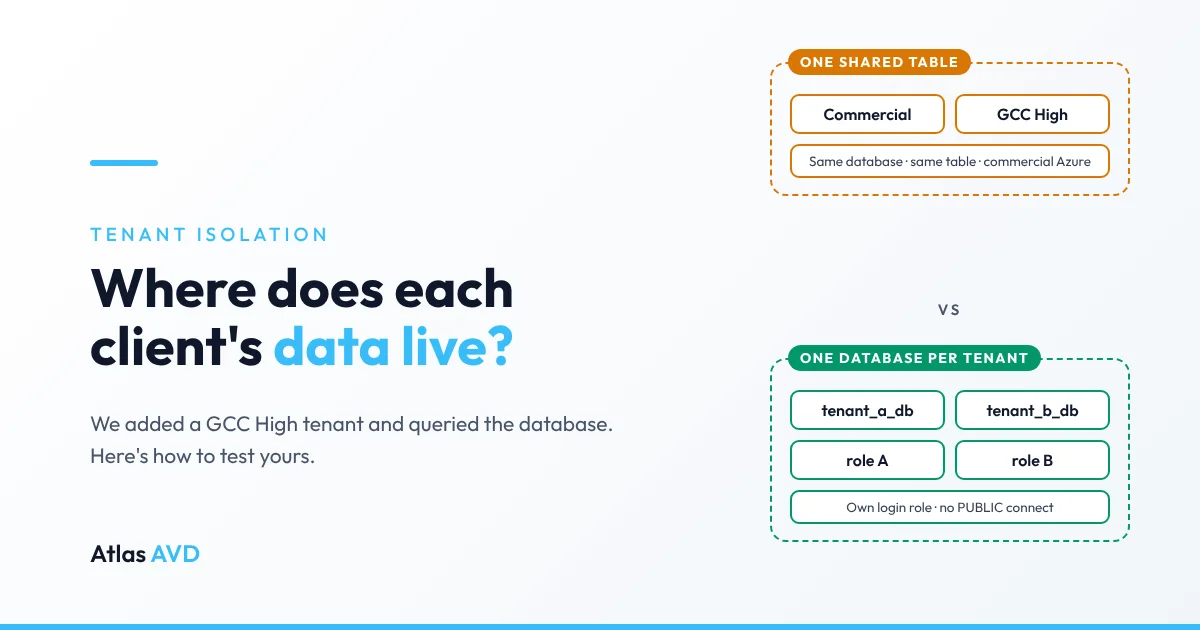
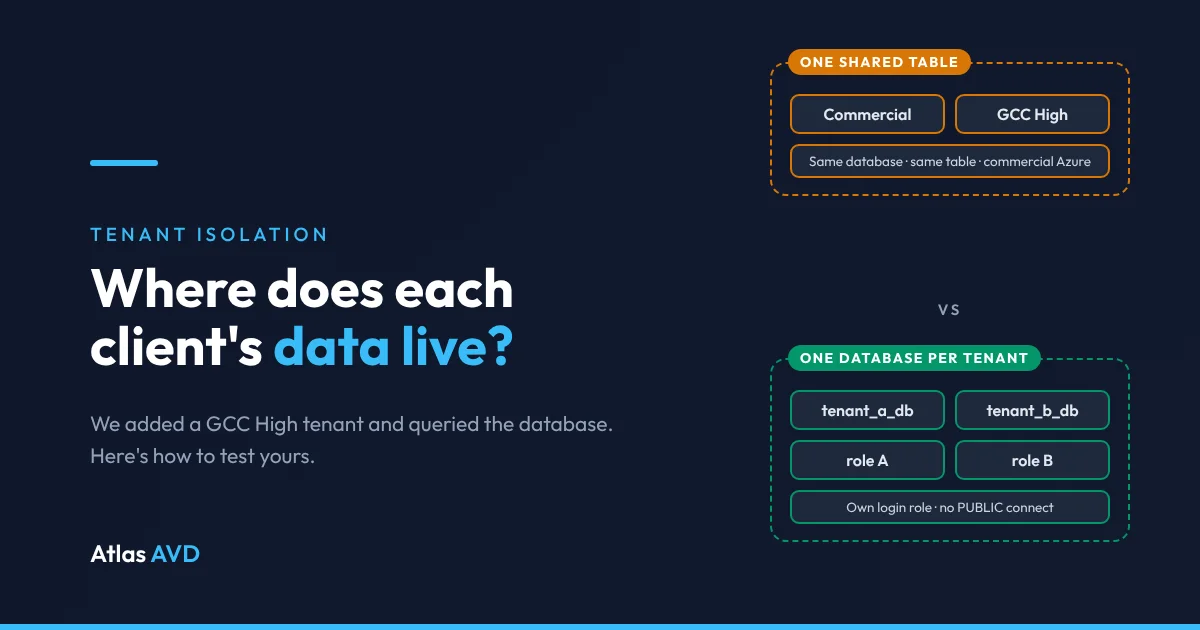
Vendor answers to that question tend to be phrased as reassurance: "data is logically separated," "tenant isolation is built in." This article shows how to check the claim yourself, what we found when we checked one platform, how Atlas AVD is built, and where our own design still has gaps.
Not legal or compliance advice. CMMC certifies an organization's environment, not a software product. Nothing in this article makes any product, ours included, "compliant" or "non-compliant" by itself. These are findings about one deployment as it was configured, and about Atlas AVD's design. Scoping decisions belong to you, your assessor and your advisors.
What we tested
On 20 November 2026 we examined one deployment of a widely used multi-tenant AVD management platform. Like Atlas, it deploys into the MSP's own Azure subscription: a web app, an Azure SQL database, a key vault, a Log Analytics workspace and a storage account. This deployment was in commercial Azure (East US 2).
A commercial client tenant was already connected. We added a GCC High test tenant through the product's normal Add Tenant flow, then queried the SQL database behind it. We aren't naming the product: the point is the method, and every finding below is something you can check against your own tool in under an hour.
| # | What we observed | How we saw it |
|---|---|---|
| 1 | The GCC High tenant was stored in the same database and the same table as the commercial tenant | The tenant table went from one row to two: one marked as the global cloud, one as Azure US Government |
| 2 | No per-tenant database routing exists | No connection-string, database or catalog columns that would route a tenant elsewhere |
| 3 | Adding the GCC High tenant created no new database or server | The resource group still held one SQL server and one database |
| 4 | All of the platform's infrastructure was in commercial Azure | Resource group and resource locations: East US 2, East US, Central US |
| 5 | The database itself enforces no separation between clients | No row-level security policies; separation rests on tenant ID columns and the application's code |
| 6 | The application connects as the server administrator | The only non-system database principal was dbo |
| 7 | SQL authentication only: no Entra administrator, so no MFA or per-person trail on database access | The portal query editor reported that the server doesn't support Entra authentication |
| 8 | The database accepted connections from the public network | Public access enabled, no private endpoint |
| 9 | Every tenant's app secret is encrypted with one application key | Encrypted secret columns on the shared tenant table |
A shared database is not prohibited in itself. Logical separation can meet NIST SP 800-171 if it's designed, documented and enforced. Most of the findings above (6, 7 and 8) are configuration choices that the owner of that deployment can change today. Findings 1 to 4 are different: they come from the product's design. Separate databases for separate clients mean a separate deployment for each client, and for a GCC High client that deployment would need to be in Azure Government.
Why it matters: the requirements involved
CMMC Level 2 assesses the 110 requirements of NIST SP 800-171 Rev. 2. A management platform that holds tenant configuration, credentials and logs for an organization handling CUI is likely to come up in at least these:
| Requirement | What it asks | What to check in your tool |
|---|---|---|
| 3.1.3 | Control the flow of CUI in line with approved authorizations | Can a GCC High tenant's data reach a commercial database, workspace or AI service? |
| 3.13.1 | Monitor, control and protect communications at system boundaries | Is the database reachable from the internet? Through which endpoints? |
| 3.13.4 | Prevent unauthorized and unintended information transfer via shared system resources | Do clients share a database, a table, a login, an encryption key? |
| 3.1.5 | Employ least privilege | Does the app connect as the server administrator? |
| 3.5.3 | Use MFA for privileged and network access to privileged accounts | Can anyone reach the database with a password alone? |
| 3.3.2 | Trace actions to individual users | Would database access show a named person, or a shared admin login? |
The DoD's Level 2 Scoping Guide treats assets that hold Security Protection Data, including configuration, logs and credentials for in-scope systems, as part of the conversation. A management platform's database usually holds exactly that. Our compliance boundary guide covers the scoping questions in more depth.
How Atlas AVD separates tenants
We designed Atlas so that the database, not just the application, keeps tenants apart. Here is what the product does, and where it still depends on you or on us.
One PostgreSQL database per managed tenant. When you add a tenant, Atlas provisions a new database for it on the PostgreSQL server in your subscription. A tenant's configuration, inventory, history and audit log live there and nowhere else. Tenant ID columns stay on the tables too, as a second layer.
A separate login role for each tenant database. Each tenant database is owned by its own PostgreSQL login role. When Atlas serves a tenant, it connects as that tenant's role, so a bug that picked the wrong database would fail at connect time instead of reading another client's data. Each role:
- owns its own database and no other;
- holds no server-wide privileges and belongs to no other role;
- is the only role allowed to connect, because
CONNECTandTEMPORARYare revoked fromPUBLICon every tenant database; - has a password generated by Atlas, stored only in your Key Vault, and rotated automatically.
Signed evidence, per tenant. Tenant Isolation Assurance produces an assessor-ready attestation for one tenant at a time, with a verification hash so a later edit is detectable, and a PDF you can hand over. It checks that tenant's own boundary only: its dedicated database, the role its connections use, and tenant ID coverage. If a tenant's role can't be set up or its password can't be read, Atlas falls back to the deployment's service role for that tenant and logs an error, and the attestation's dedicated-database check fails until it's fixed. The fallback shows up as a failure, not as a pass.
GCC High can't be added to a lower cloud. A deployment's primary tenant sets its cloud. Atlas refuses to add a managed tenant from a higher-sovereignty cloud than the primary: a commercial deployment can't take on a GCC or GCC High tenant, and a GCC High deployment can't take on a second GCC High organization. Each GCC High customer runs its own deployment, in its own Azure Government subscription. The same check runs when a tenant is restored from the recycle bin or the primary tenant changes, so it can't be walked around after onboarding.
Your network, your rules. The server sits in your subscription, so its network access is yours to set. Our own development deployment runs with public access disabled, a private endpoint only, and TLS 1.2 enforced.
What still depends on someone:
- The deployment's service role is a member of every tenant role. Atlas needs that for provisioning, migrations and backups. It's a privileged credential, and it belongs in your System Security Plan.
- FIPS mode is opt-in, not the default. A GCC High deployment should turn it on.
- Your documentation is yours. The SSP, POA&M, policies and customer responsibility matrix are the organization's to write. An attestation is evidence for them, not a substitute.
- GCC High onboarding is waitlisted while we validate it end to end. Self-service trials run in Azure commercial today; join the GCC High waitlist for early access.
Don't take that list on trust either. The next section shows how to check it.
How to run the test yourself
These steps work for any management platform that deploys into your own subscription. Test with at least two tenants, and if you can, make one of them GCC High. Remove the test tenant and its secret afterwards.
If your tool uses Azure SQL
The portal's query editor is the quickest route. It needs either the server administrator login (from the web app's connection string) or an Entra administrator set on the server. Run each query on its own; the editor shows only the last result set.
-- Which tables hold tenant or customer identifiers?
SELECT TABLE_NAME, COLUMN_NAME FROM INFORMATION_SCHEMA.COLUMNS
  WHERE COLUMN_NAME LIKE '%tenant%' OR COLUMN_NAME LIKE '%customer%';

-- Is there any per-tenant routing to another database?
SELECT TABLE_NAME, COLUMN_NAME FROM INFORMATION_SCHEMA.COLUMNS
  WHERE COLUMN_NAME LIKE '%Connection%' OR COLUMN_NAME LIKE '%Database%' OR COLUMN_NAME LIKE '%Catalog%';

-- Does the database enforce row-level security?
SELECT * FROM sys.security_policies;

-- Which principals exist, and how do they authenticate?
SELECT name, type_desc, authentication_type_desc FROM sys.database_principals WHERE type NOT IN ('R');

-- Row counts per table, before and after you add a tenant
SELECT t.name, SUM(p.rows) FROM sys.tables t JOIN sys.partitions p
  ON p.object_id = t.object_id AND p.index_id IN (0,1) GROUP BY t.name ORDER BY 2 DESC;
Then read the rows of the tenant table you found: does a GCC High tenant sit next to commercial ones? sys.databases isn't conclusive on Azure SQL, so count databases in the portal under the server's SQL databases. While you're there, check Networking (public access, firewall rules, private endpoints), Microsoft Entra ID (is an Entra admin set?) and the locations of every resource in the group.
If your tool uses PostgreSQL (Atlas AVD)
Azure Database for PostgreSQL has no portal query editor, and a well-configured server only accepts private connections. Run the queries from a VM inside the virtual network, or, on a non-production deployment only, open the server briefly to your own IP:
MYIP=$(curl -s https://ifconfig.me)
az postgres flexible-server update -g <rg> -n <server> --public-access Enabled
az postgres flexible-server firewall-rule create -g <rg> -n <server> --rule-name isolation-test --start-ip-address $MYIP --end-ip-address $MYIP
Check that every tenant has its own role, that none is a superuser, and that each tenant database is owned by its own role with no PUBLIC connect in its access list:
az postgres flexible-server execute -n <server> -u <admin> -p '<password>' -d postgres --output table \
  -q "SELECT rolname, rolcanlogin, rolsuper FROM pg_roles WHERE rolname LIKE 'atlas_tenant_%';"
az postgres flexible-server execute -n <server> -u <admin> -p '<password>' -d postgres --output table \
  -q "SELECT datname, pg_get_userbyid(datdba) AS owner, datacl::text FROM pg_database WHERE datname LIKE 'tenant_%';"
Then try to cross the line. Tenant A's role connecting to tenant B's database should be refused with permission denied; the same role connecting to its own database should succeed:
# Should FAIL
az postgres flexible-server execute -n <server> -u <tenantA_role> -p '<tenantA_password>' -d <tenantB_db> -q "SELECT 1;"
# Should SUCCEED
az postgres flexible-server execute -n <server> -u <tenantA_role> -p '<tenantA_password>' -d <tenantA_db> -q "SELECT 1;"
Each tenant role's password is in your Key Vault as atlasavd-<tenant>-pg-role-password. Read it in the portal, and never paste it into a ticket or a chat. Close the server again as soon as you're done:
az postgres flexible-server firewall-rule delete -g <rg> -n <server> --rule-name isolation-test --yes
az postgres flexible-server update -g <rg> -n <server> --public-access Disabled
Don't tick Allow public access from any Azure service to make the test easier: that opens the server to every Azure customer's resources, not just yours.
Questions to send your vendor in writing
If you can't query the database yourself, because the platform is vendor-hosted or you don't have access, ask for these answers in writing:
- Is each client tenant stored in its own database, or in shared tables?
- If shared, what enforces the separation: row-level security, separate logins, or only application code?
- Which login does the application use to connect, and what can it reach?
- Can the database be reached from the public internet?
- Is database access authenticated through Entra ID with MFA?
- Is each tenant's credential encrypted with its own key, or with one key for all tenants?
- Can the platform run in Azure Government? If I add a GCC High tenant to a commercial deployment, where is its data stored?
- Do any tenant's logs, telemetry or AI conversations reach a shared workspace or service?
A clear answer, whatever it is, is something your assessor can work with. "Data is logically separated" with no detail is a finding in itself.
FAQ
Is a shared multi-tenant database allowed under CMMC?
It isn't prohibited. NIST SP 800-171 requirement 3.13.4 asks you to prevent unintended information transfer through shared resources, and logical separation can meet it if it's designed, documented and enforced. What matters is what enforces the separation, and whether CUI from a GCC High organization ends up in a commercial-cloud boundary.
Can I add a GCC High tenant to a commercial AVD management platform?
Some platforms let you, and the desktops will work. The tenant's configuration, credentials and logs then live wherever that platform's database lives, which may be commercial Azure. Atlas AVD refuses the combination: a GCC High tenant needs its own deployment in Azure Government.
How does Atlas AVD isolate tenants?
Each managed tenant gets its own PostgreSQL database, owned by its own login role that can't connect to any other tenant's database. Atlas connects as that role when serving the tenant, the role's password lives in your Key Vault and rotates automatically, and the tenant's isolation attestation fails if it ever falls back to the shared service role.
How do I check where my AVD management tool stores client data?
If the tool deploys into your subscription, query its database: find the tables with tenant ID columns, add a second test tenant and see where its rows land, then check the server's network access, authentication and location. If it's vendor-hosted, ask the vendor the questions above in writing.
Does deploying a tool in Azure Government make it compliant?
No. Azure Government's FedRAMP and DoD authorizations cover Microsoft's services, not the applications you run on them, and CMMC assesses your organization, not a product. Running the platform in Azure Government changes the facts your scoping is based on; it doesn't settle the scoping.
Want to see the separation for yourself? Start a free trial, add two tenants, and run the queries above. Our GCC High guide covers the rest of a CUI enclave on AVD.